Website News
All updates, additions, and improvements made to Legion Campaign.
Contact
You can now contact me via the website.
- There now is an easy way to report bugs and give feedback! At the bottom right of the page you can find a contact button that will take you to the contact page. Here you can choose a category and send me a message. You are also able to send photos along with your message.
Random starting world limits
Random starting allocations give each team at most one Factory planet and at most one Military planet.
- A planet with both types counts towards both limits. Advanced random starts still balance SP and CP production exactly between teams.
- The limits apply to fixed-count and all-planets random distribution. If no valid distribution exists, setup stays open rather than silently exceeding the limits. Manual setup and running campaigns are unchanged.
Casualty checks use the full dice pool
Defeated units roll one attack die plus one per existing setback, in standard and advanced campaigns.
- Any surge makes the unit a casualty, subject to existing Paragon and Medevac protection. Without surges, any hit adds one setback. Only an all-crit pool grants 2 XP and one setback.
- All blanks, or a mixture of crits and blanks without hits or surges, grant 1 XP and no setback. Extra dice never add multiple setbacks from one check.
- Automatic battle checks, auto-resolve, orbital bombardment and emergency retreat use the same rule. Manual battle input shows the dice count and accepts the combined pool result.
Roster status and veteran rank
Map roster portraits now show small commendation and setback icons with one gold chevron per effective veteran rank.
- Status badges sit in the upper-right corner without covering the full portrait. Units without commendations, setbacks or veteran ranks show no unnecessary badges.
- Enemy roster status and veteran ranks remain concealed, including units whose portraits were revealed by earlier battles or communication.
Export and import registers as JSON
Download your registers as JSON and import them into the builder as a new register.
- Export JSON is available on your own registers in Register Overview. Import JSON opens the builder, where you can upload a file and review it before saving. Existing registers are never overwritten.
- Transfers include units, upgrades, XP, commendations, setbacks, lore, SP, Combat Potential, strategic assets, Story Arc progress, reputation and the register icon. Units and upgrades are resolved against the current catalog; normal campaign validation and advanced construction costs still apply.
- The new register belongs to the importing player and uses a location chosen in the current campaign. Saved army lists and linked battle history are not copied. Uploaded photos are referenced, not embedded; they only remain available where the original files exist. Files are limited to 5 MB and 200 units.
Multiple campaigns, one account
Find and switch between your campaigns in Settings under My Campaigns.
- Join or start another campaign without losing your existing memberships. Each campaign keeps its own player, team, registers and progress.
- My Campaigns shows your team and active campaign. Switch without entering its password again; only campaigns you already belong to are available. Your active campaign is remembered when you log in again.
- Joining a new campaign still requires its ID and password. Creating another campaign no longer moves your player or registers out of an earlier campaign.
Correct casualty check symbols
Manual casualty checks now show the correct attack die symbols and probabilities.
- Hit (3/8): a setback. Surge (1/8): a casualty. Crit (1/8): 2 XP and a setback. Blank (3/8): 1 XP.
- Paragon and Medevac protection still apply to casualty results. Automatic rolls and previously saved outcomes are unchanged.
Major update highlights and notifications
Site administrators can highlight major updates, pinning them above other website news in a distinct colour.
- A notification bell beside Settings shows a red count of highlighted updates you have not opened. Open an update on Home or Website News to mark it as read.
- Read status is saved per account across devices. Editing a read update does not notify you again.
- Disable highlighted website news notifications in Settings to hide the bell and counter. Highlighted updates remain available in website news.
Story Arc commendations save correctly
Fixed register saves rejecting valid Story Arc commendations such as Go Where the Money Is.
- Register validation now recognises the commendation belonging to your selected Story Arc alongside general commendations.
- The editor and save validation use the same Veteran Rank, unit type and Paragon requirements. Story Arc commendations also show their effect in the register.
Recognise enemy units after battle
Enemy rosters now reveal portraits of units you have fought in completed battles.
- Standard and advanced campaign maps recognise the specific units that participated against you in completed tracked battles, including existing battle records.
- Units that did not participate, including newly added reinforcements, remain question-mark portraits. Renaming a unit does not erase recognition.
- Active and cancelled battles do not reveal portraits. Enemy unit, register and player names remain hidden in the roster.
Army rosters on standard campaign maps
Standard campaign maps now show the same compact unit portrait roster as advanced campaigns.
- Select a register marker or a register in a planet or sector's list to open its roster inside the map panel.
- Friendly rosters show active units with soft-edged portraits and no unit captions. Enemy roster details remain concealed behind question-mark cards.
- The roster supports horizontal scrolling and can be closed with its close button or Escape. Selecting another planet or sector closes it.
Clearer completed battle results
Completed Battles now shows a compact results summary, while cancelled battles have their own collapsed archive.
- Each completed battle shows its recorded result, final VP score, army lists, players, planet, objective, final round and completion date.
- Cancelled battles no longer appear among completed battles and do not count as played results. Participants can still open them from Cancelled Battles.
- The results overview adapts to desktop and mobile screens.
Planet environmental effects in battles
Battle preparation now opens a planet effects pop-up, and the battle page displays the active rules throughout the game.
- Changing the contested planet shows its environmental effects again. The pop-up can also be reopened manually.
- Jungle/Forest, Hazard, Military, Swamp, Frozen and Desert rules have distinct coloured outlines and full explanations from the campaign rulebook.
- All applicable effects are shown for planets with multiple types. New battles preserve the planet types selected at the start.
Faction-themed battle news images
Added ten battle illustrations to the Holo Net battle report image selection.
- Automatic artwork now matches the winning army's faction and checks the opponent when both sides appear in the image.
- Surrender and victory scenes are reserved for the appropriate result. Draws use general battle imagery.
- Uploaded battle photos and custom news images keep priority. A neutral transmission image is used when no suitable artwork is available.
- Images are hosted on this website, not loaded from external image sites.
Army list and battle tracker fixes
Fixed upgrade selection when editing army lists and made battle tracker inputs more reliable.
- Mandalorian Clans lists can use the generic Mandalorian affiliation without purchasing a clan upgrade.
- Dug In is available to Emplacement Troopers and Troopers with Prepared Position, including units without a normal Training slot.
- Editing an army list preserves equipped purchased upgrades and validates newly purchased upgrades against the current register.
- Battle scores, round, notes and other unsaved inputs are protected from automatic refresh while you edit.
Team management and battle records
Campaign scoreboards now use saved battle results for faction wins and losses, and campaign creators can manage teams during play.
- Wins, losses and battles include completed tracker reports without relying on campaign news text. Draws count as battles, not losses.
- Use Manage Teams in Settings to add teams or remove them with confirmation.
- Occupied teams require a replacement team, preserving players, registers, control and Advanced Campaign assets. Historical battle reports are kept.
- A team campaign must retain at least two teams. End or cancel active battles before removing teams.
Reliable bloodiest battle statistics
Completed battles from the battle tracker now feed Bloodiest Battle and Bloodiest Battleground directly from their saved results.
- Defeated units and permanent casualties remain counted even when campaign news text is edited.
- Older battle reports still contribute, without counting tracker battles twice.
- Statistics update after End Battle; active and cancelled battles do not contribute.
Unit portraits in Register Overview
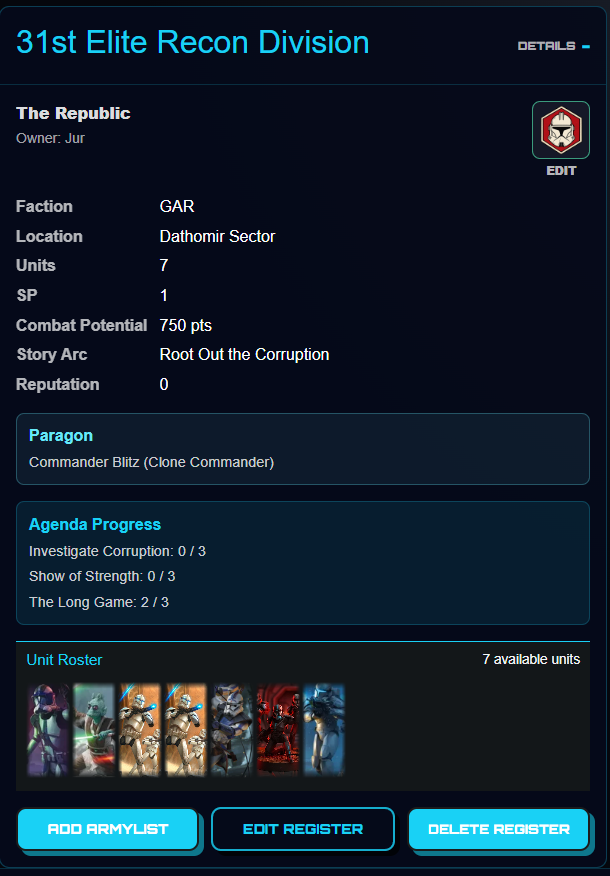
Expand a register to see its unit roster below the register details and above the action buttons.
- The overview uses the same compact, soft-edged portraits and custom photo framing as campaign maps.
- Existing team filters and edit permissions are unchanged. Team members can also view portraits in friendly read-only registers.
- Rosters load when a register is expanded and support horizontal scrolling on desktop and mobile.
Photo uploads in the battle tracker
Both participants can now upload photos on the new battle page.
- Add up to three JPG, PNG or WEBP photos, up to 2 MB each. Photos are shared immediately without overwriting unsaved battle progress.
- Photos remain visible with completed battle results and are included in the campaign news report. The first photo takes priority over automatic news artwork.
Use your unit photo as its roster portrait
Players can choose to use their uploaded lore photo as a unit's portrait.
- Enable Use this photo as unit portrait in the unit's lore, apply the lore and save the register.
- The photo appears in friendly rosters on standard and advanced campaign maps. Enemy units remain concealed.
- Turn off the option or remove the photo to restore the default unit portrait. Existing lore photos keep their current behaviour until this option is enabled
- Choose horizontal and vertical positioning and zoom while keeping the roster's fixed portrait proportions. Reset portrait restores the original framing.
- Apply lore and save the register to use the same framing in standard and advanced campaign rosters, including recognised enemy units.
- Framing settings reuse your uploaded photo without storing extra image copies. Unrecognised enemy units remain concealed.
Commendations and setbacks in battle lists
Battle army lists now show each unit's commendations and setbacks without expanding its cards.
- Use the question mark beside a commendation or setback to view its rules.
- New battles preserve these rules as they were when the battle started.
Collapsible battle army lists
Each army list in the battle tracker can now be expanded or collapsed independently.
- Click an army list heading to hide or show its units, cards and Agenda.
- When one list is collapsed, the other list uses the available width.
Visible battle upgrade names
Army lists in the battle tracker now show upgrade names directly beneath each unit.
- Equipped upgrades are visible as text without expanding the unit.
- The expandable unit and upgrade card viewer remains available.
Shared battle tracker
Prepare a battle together and track it from Campaign > Battles.
- Battle Report now opens a preparation menu for the army lists, planet, objectives and agendas, followed by Start Battle.
- Both participating players can track rounds, VP, defeated units, who defeated them, POI positions and Agenda progress on a shared battle page.
- Only your own command cards are visible. Saved updates are shared with your opponent, with protection against overwriting newer changes.
- End Battle calculates the result and processes campaign control, casualty checks, XP, SP, Agendas and the Campaign News report once.
- Unit lore now has an automatic Killfeed with Units Defeated, Times Downed and details showing opponents and casualty outcomes.
- Participating registers and army lists are protected against changes during an active battle.
Army lists in unit battle history
Unit lore now shows which army list the unit fought with in each battle.
- Unit battle history now says 'Fought with the' followed by the army list name.
Unit lore and battle history
Give your units their own story and share it with your campaign.
- Open Lore next to a selected unit's upgrade slots to name its miniatures and write a description.
- Optionally track miniatures killed and lost, and add one unit photo up to 2 MB.
- Unit battle history lists recorded battles featuring the unit, with permanent line-up snapshots for new reports.
- Historical participation inferred from existing saved army lists is labelled separately.
- All campaign players can view unit lore through the Lore buttons beside the Top 5 XP units.
Commander and operative starting upgrades
Fixed the free starting upgrade allowance for commanders and operatives.
- Commanders and operatives can acquire their first two optional upgrades without spending SP, regardless of their unit type.
- Required upgrades do not consume this allowance.
- Supply Points (SP) can be corrected manually in the register editor and saved with the register.
Army list navigation
Return directly to your saved army lists from the editor.
- Replaced Cancel Edit and Close Builder with Back to Overview.
- The button now closes the editor and returns to the saved army list overview in one click.
Register editor stability
Reduced server memory use while opening and updating registers.
- Opening and updating registers would crash the site, this problem has been fixed.
- The unit and upgrade catalogues are now shared instead of being rebuilt repeatedly for every register editor.
- Register validation now reuses the same catalogue data, preventing large temporary memory spikes that could disconnect other players.
Illustrated register markers

A new hand-drawn marker collection is available for registers.
- Added simplified illustrated versions of the Republic, CIS, Empire, Mercenary, and Rebel faction markers.
- Added illustrated Walker, Assault Tank, Hover Tank, and Armored Transport markers.
- The illustrated Empire marker now uses a dedicated stormtrooper helmet.
- Removed the earlier realistic vehicle marker variants; the original faction marker collection remains available.
New vehicle register icons
Four new vehicle-themed markers are available for registers.
- Added Walker, Assault Tank, Hover Tank, and Armored Transport register icons.
- The new icons can be selected from the existing register icon picker and appear on the campaign map.
Editable player names
Players can now change the name shown to other campaign participants.
- Added a Player Name setting under personal settings.
- Changing a player name updates campaign screens, registers, and future campaign participation without changing the login username.
- Player names must be unique within a campaign.
Savage Opress joins the battle
Two versions of Savage Opress and his command card are now available.
- Added Savage Opress, Maul's Enforcer, to the Shadow Collective.
- Added Savage Opress, Dooku's Apprentice, to the Separatist Alliance.
- Added We Shall Start with Revenge for both Savage Opress versions.
Campaign map readability
Register information is now easier to read in planet and sector overviews.
- Register names now use high-contrast white text, with lighter team and owner details.
New Rebel and Separatist units
Several recently released units, upgrades, and command cards have been added to the builders.
- Added Han & Chewie, Notorious Scoundrels, including their required Personnel upgrades and three command cards.
- Added Admiral Trench, Fleet Commander, and his required Caught in a Web upgrade.
- Added B2 Super Rocket Battle Droids and their Personnel and Heavy upgrade options.
- Added Droid Trooper as a supported unit type.
Website news and admin tools
A compact website changelog and new administration tools are now available.
- Added the expandable Website News section to the home page.
- Campaign managers can edit and delete entries from the Campaign Log.
- Campaign managers can replace a campaign map image from the Map Editor without losing planets, sectors, control, Victory Points, or campaign progress.
- Campaign managers can now edit sector VP in the map editor.
- Map replacements support JPG, PNG, GIF, and WEBP images up to 12 MB.
Mounted Jedi update
Mounted Jedi profiles and their card restrictions have been expanded.
- Added Obi-Wan Kenobi, Mounted Jedi General, with his unit card and command card.
- Updated Anakin Skywalker and Jedi Knight, Mounted Jedi General, with their correct points and upgrade slots.
- Strike and Fade is now a Training upgrade restricted to Vehicle units with the Speeder keyword.
- Mounted versions can use the appropriate character command cards and Evasive Action.